WiZone Portal
Settings
Settings page allows administrators to configure company information, default network behavior, and account policies for all connected devices and users.
General Settings
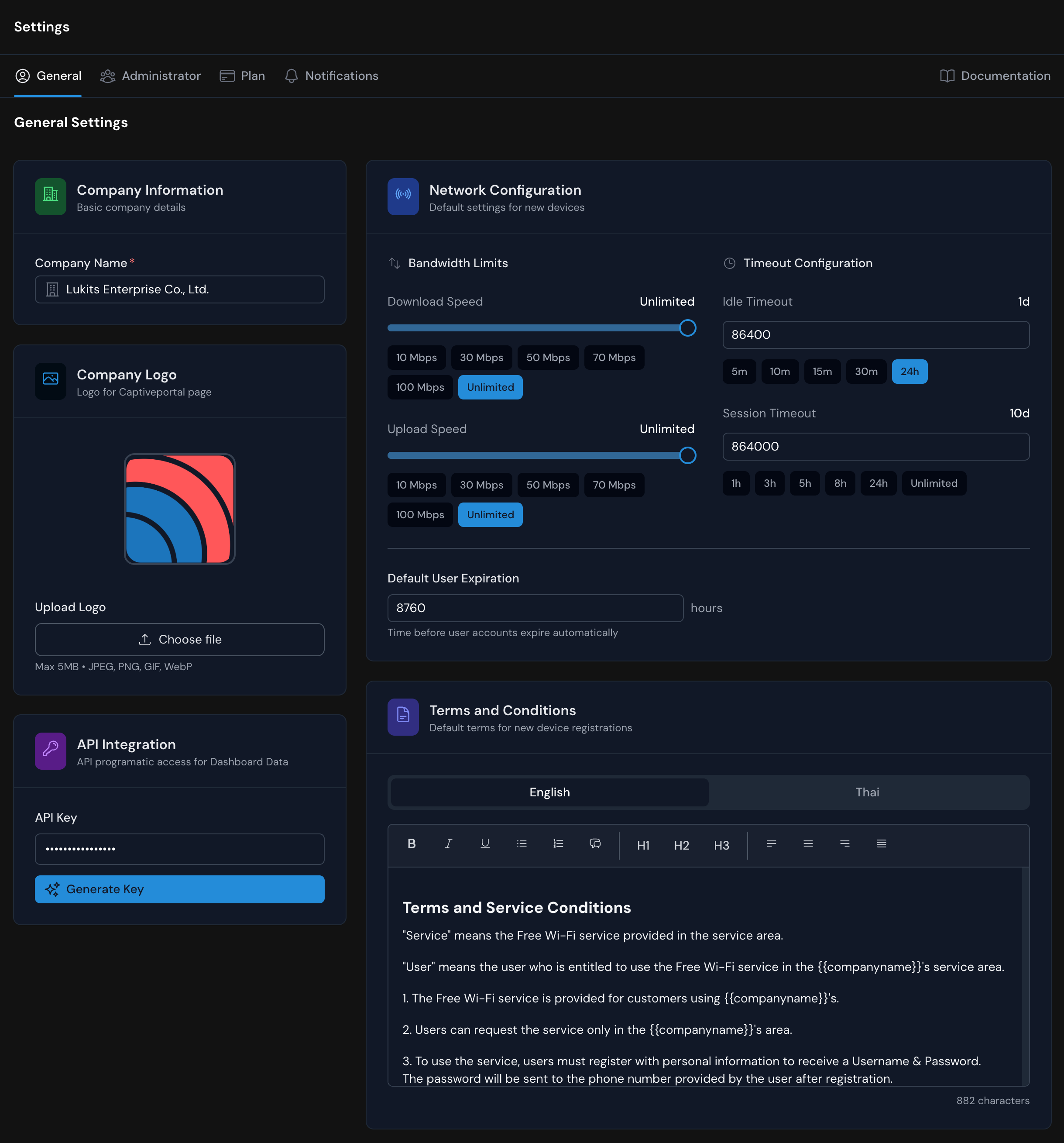
| Section | Description |
|---|---|
| Company Information | Displays your registered company name and allows you to upload a logo for captive portal branding. Supported formats: JPG, PNG, GIF, WebP (max 5MB). |
| Network Configuration | Defines default network performance and timeout rules for new devices. - Bandwidth Limits: Set max upload/download speeds. - Timeouts: Configure idle and session timeouts for users. - Default Expiration: Automatically deactivate users after the set number of hours. |
| Terms and Conditions | Create and edit bilingual (English/Thai) Wi-Fi service terms shown to users before registration. Markdown and formatting tools are supported. |
| API Integration | Generate and manage an API Key to connect the WiZone dashboard with external systems for data synchronization. |
Audit Logs & User History
WiZone keeps a complete record of system activities to help administrators track actions, user events, and security logs efficiently.
Administrator Management
The Administrator tab allows the system owner or super admin to manage user roles and permissions for accessing the WiZone dashboard.