Created with Fabric.js 5.3.0
    • WiZone Overview
    • WiZone Dashboard Overview
    • User Management
    • Online Users
    • Network Access Server (NAS)
    • Firewall Logs
    • Audit Logs & User History
    • Settings
    • Administrator Management
    • Reports Page
    • Install WireGuard
    • Configure WireGuard
    • WireGuard Connection
    • Network Configuration
    • Configure WiZone RADIUS
    • Configure Captive Portal Zone
    • Allow Hostnames and Configure Log Settings
    • Mikrotik Setup for WiZone
    • Configure Static Routes for WiZone
    • Configure DHCP Network
    • Configure DNS and Static Entry
    • Import SSL Certificate for WiZone Captive Portal
    • Configure RADIUS Server for WiZone Authentication
    • Configure Hotspot Profile for WiZone
    • Configure Hotspot Server for WiZone
    • Configure Remote Logging for WiZone
WiZone Portal

Reports Page

Reports page provides a full overview of WiZone network performance and user activity over time.
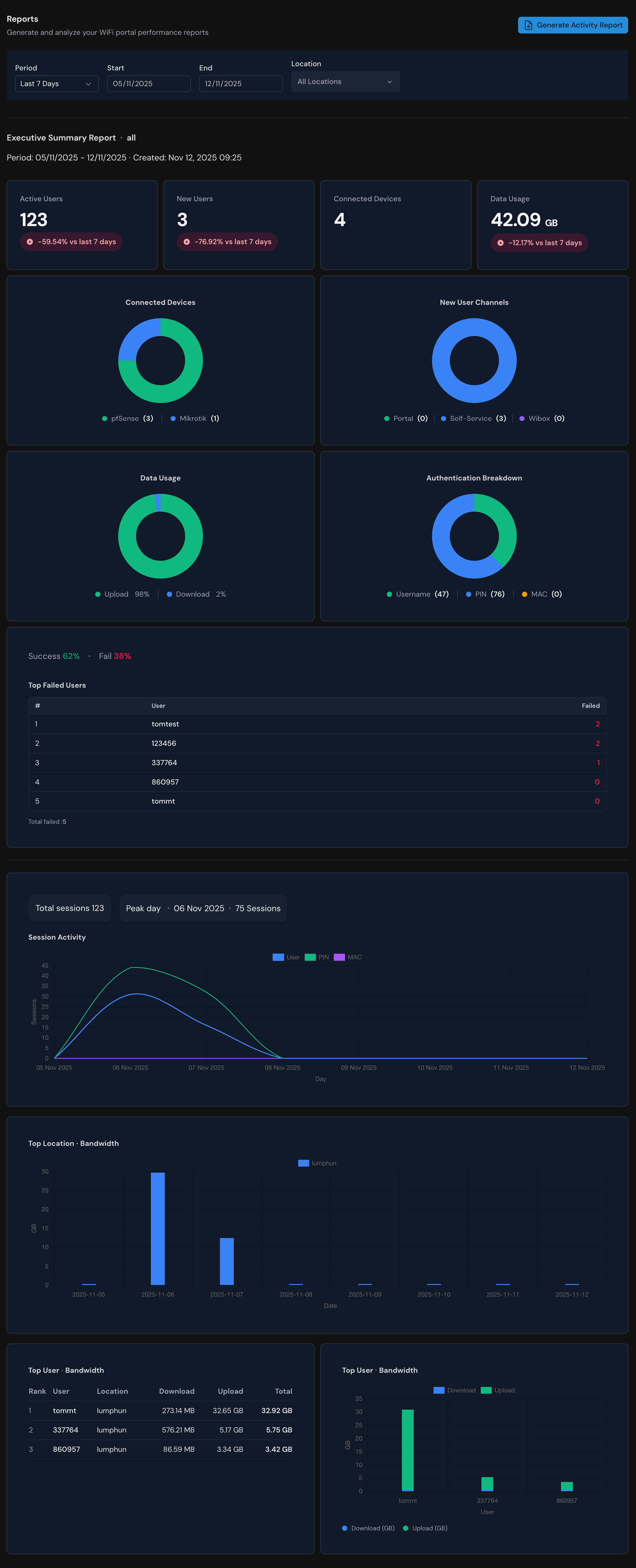
WiZone Report Dashboard

Configuration Panel

FieldDescription
PeriodChoose the data range (Last 7 days, 30 days, or custom).
Start / EndManually set the report duration.
LocationFilter reports by specific hotspot or branch.
Generate Activity ReportCreates a new summary report for the selected period.

Exporting Your Report

To download as a PDF ypu can click Generate Activity Report.

Administrator Management

The Administrator tab allows the system owner or super admin to manage user roles and permissions for accessing the WiZone dashboard.

Install WireGuard

This section explains how to install and enable WireGuard on pfSense.

Copyright © 2025